
Dante Controller
Voice-controlled Dante network discovery, audio routing, labeling, and device configuration over the native ARC/ConMon protocol.
22 Tool Functions · 4 capabilities · 1 supported model
Capabilities
Everything Showcaller can do with Dante Controller
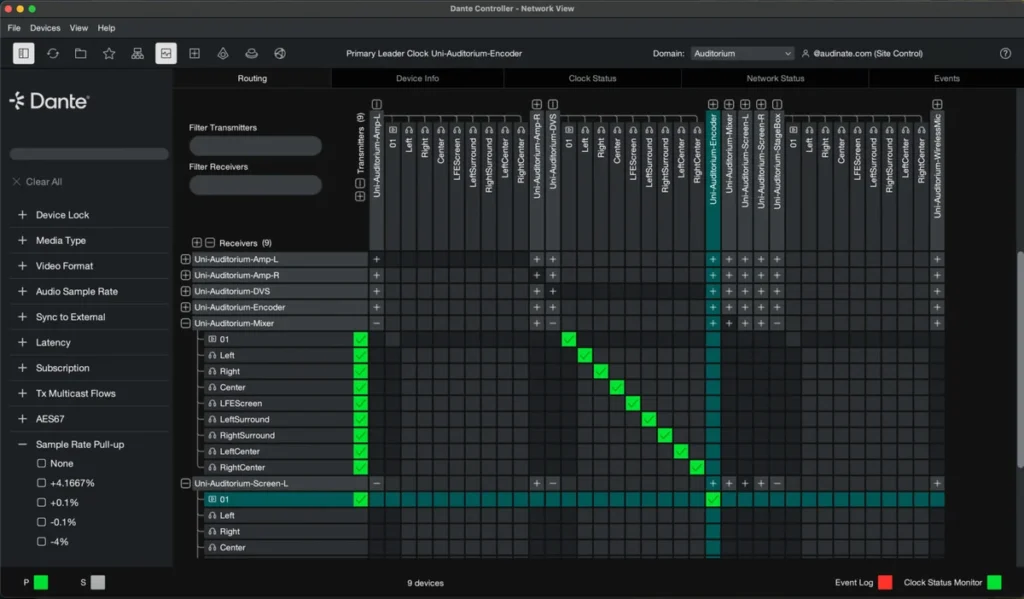
With Showcaller AI, Dante audio routing is as simple as asking for it. This is Showcaller's Dante Network integration, not Audinate's Dante Controller app. Instead, the integration works alongside Audinate's Dante Controller app, and both can run on the same computer. Showcaller talks to Dante devices directly from the Bridge App on your show network. You need no Dante Domain Manager and no per-device setup. Just add one connection, with no IP address to type. Then Showcaller discovers every Dante device on the network.
Badges show the plan a group of Tool Functions is included from. Higher plans include everything below them. Compare plans
How it works
How it works with Dante Controller
From there, Showcaller lists each device's transmit and receive channels. It also shows what every receive channel subscribes to. Dante audio routing then works by name, so you route a receive channel to a transmitter by device and channel name. For example, say "send stage box channel 3 to the recorder, input 1". You can also clear a route.
To keep the patch readable, Showcaller can rename devices and label channels. It can also set a device's sample rate, bit depth and receive latency. The same goes for sample-rate pull-up or pull-down. On devices with adjustable outputs, such as AVIO adapters, it sets the analog output level too.
A network-wide view reports whether each device is online. It also counts how many of its incoming routes are healthy or broken. So a broken patch shows up before someone hears it.
Showcaller reads most changes back from the device before it reports them done. Some changes interrupt audio or can break routes, such as sample rate, bit depth and latency. Pull-up, device renames and clearing a route belong in that group too. Showcaller confirms those with you first. For networks that use Dante Domain Manager, see the Dante Domain Manager integration.
Tool Functions
Every Tool Function for Dante Controller
Grouped by capability, with the plan each group is included from. Where the device reports its state, Showcaller reads the change back before calling it done.
Device & Channel StatusStarter9
See exactly what a Dante device is doing: its name, how many transmit and receive channels it has, the label and live subscription of every receive channel, and its sample rate, latency and encoding. These reads give the AI the device's full routing and audio state and stream it into Showcaller's Digital Twin so operators watch cross-points and settings change live.
- Discover devicesFind every Dante device on the local network and list each one's name and IP address, with no Dante Controller or Domain Manager needed.
- Get audio statusRead a Dante device's sample rate and bit depth.
- Get channel countRead how many transmit and receive channels a Dante device has.
- Get device nameRead a Dante device's current name.
- Get device settingsRead a Dante device's sample rate and receive latency.
- Get pullup and output levelsRead a Dante device's sample-rate pull-up setting and the analog level of its first two channels, where the device reports them (needs Bridge 7.15 or newer).
- List network RX healthFind every Dante device on the network and report, for each one, whether it is online and how many of its incoming audio routes are healthy or broken.
- List RX channelsList a Dante device's receive channels and which source each one is subscribed to, with its status.
- List TX channelsList a Dante device's transmit channels by number and name, the sources other devices can subscribe to.
Audio RoutingStarter2
Route Dante audio on the fly with a single voice command. Subscribe any receive channel to a transmitter by device and channel name — the way Dante itself resolves routing, so cross-points survive device swaps and renames — or clear a subscription to drop a source. The routing matrix streams back into the Twin so the operator always sees where audio is flowing.
- Clear subscriptionRemove the audio route from one receive channel on a Dante device.
- Subscribe channelRoute audio by subscribing one receive channel on a Dante device to a source, named by its device name and channel name.
LabelingPro6
Keep a Dante patch readable. Rename the device and label its transmit and receive channels so every subscription across the network resolves to human-friendly names — essential when prepping a show or relabeling a stage box. Resets restore factory defaults in one call.
- Reset device namePut a Dante device's name back to its factory default.
- Reset RX channel namePut a receive channel's name back to its default.
- Reset TX channel namePut a transmit channel's name back to its default.
- Set device nameRename a Dante device; other devices find their sources by name, so a rename can break or redirect routes.
- Set RX channel nameRename one receive channel on a Dante device.
- Set TX channel nameRename one transmit channel on a Dante device; receivers subscribe by this name, so a rename can break their routes.
Audio ConfigurationPro5
Tune the audio engine of a Dante device: sample rate, PCM bit depth, receive latency, sample-rate pull-up/down for video sync, and analog output reference level. These are the settings that make a Dante node interoperate cleanly across a mixed network — applied directly and read back so the change is verified, with the caveat that sample-rate and encoding changes briefly interrupt audio.
- Set encodingSet a Dante device's audio bit depth to 16, 24 or 32 bits.
- Set latencySet a Dante device's receive latency in milliseconds; higher values tolerate larger networks.
- Set output levelSet the analog output level of one output channel on a Dante device that has adjustable analog outputs, such as an AVIO adapter.
- Set pullupSet a Dante device's sample-rate pull-up or pull-down, used to keep audio locked to video frame rates.
- Set sample rateSet a Dante device's sample rate, such as 48 kHz or 96 kHz, which briefly interrupts its audio.
Compatibility
Supported models
 Dante Network (local discovery + control)Hardware · ARC/ConMonNetwork-wide discovery and local control of Dante devices via ARC/ConMon.

FAQ
Questions about Dante audio routing
Do I need Dante Controller or Dante Domain Manager?
No. Showcaller talks to Dante devices directly. It can run alongside Audinate's Dante Controller app if you use it, but it does not need it.
What do I need to set up?
Add one Dante Network connection in Showcaller. There is no IP address, username or password to enter. However, the Showcaller Bridge App must run on a computer on the same network as the Dante devices. That can be a LAN or a VLAN.
Which plan includes which Tool Functions?
Starter includes Device & Channel Status and Audio Routing (11 Tool Functions). That covers discovery, route health, channel lists, and subscribing and clearing routes. Pro adds Labeling and Audio Configuration (11 more). That covers device and channel names, plus sample rate and bit depth. It also covers latency, pull-up and output level. There are no Enterprise-only functions for this integration. Each plan includes every Tool Function of the plans below it.
Will renaming a device break routes?
It can. Dante receivers find their sources by device and channel name. So renaming a device or a transmit channel can break or redirect routes that use it. For that reason, Showcaller asks you to confirm a device rename first.
Does changing the sample rate interrupt audio?
Yes, briefly. Sample rate and bit depth changes interrupt the device's audio for a moment. So Showcaller asks you to confirm first.