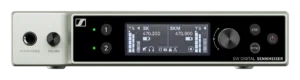
Sennheiser EW-DX EM 2 Dante receiver
Showcaller AI reads and controls both channels of a Sennheiser EW-DX EM 2 Dante by voice or chat. It covers receiver output mute, gain and frequency. It also covers channel names and linked transmitter status.
Overview
The Sennheiser EW-DX EM 2 Dante receiver with Showcaller
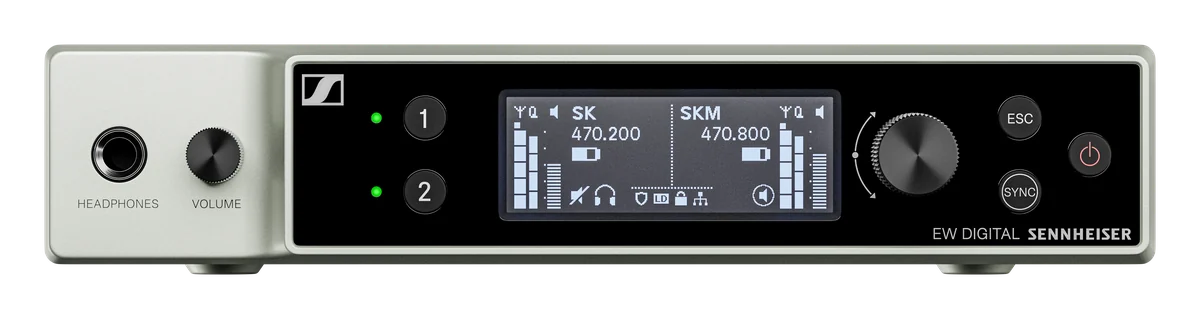
The EW-DX EM 2 Dante is a two-channel half-rack receiver in Sennheiser’s Evolution Wireless Digital range. It adds a Dante digital audio output and three network ports to the analog XLR and jack outputs. Power comes from its 12 V supply or from PoE. Showcaller AI connects to the EW-DX EM 2 Dante over your show network through the Bridge App. Then it handles requests for channels 1 and 2 by voice or chat. The Sennheiser EW-DX integration page lists every function.
What Showcaller reads on the EW-DX EM 2 Dante
In every plan, Showcaller reads each channel’s name and mute state, gain and output level. For the transmitter linked to each channel, it reads the type, name and firmware. It also reads the transmitter’s mute state and whether its controls are locked. In addition, Showcaller mutes and unmutes each receiver output, for example before a presenter walks off with a live mic. Then it reads the mute state back from the receiver. The product type, hardware revision and serial number are also available.
Gain, names and frequencies
From the Pro plan, Showcaller reads and sets each channel’s receiver gain in dB. It also names the channels after the people using them. Showcaller reads or changes a channel’s operating frequency in kHz too. However, it asks you before it retunes. Afterwards, it reads the new frequency or name back from the receiver. It reads the transmitter lock state but does not change it. Some features are not offered over the receiver’s third-party interface, so Showcaller does not offer them. These are RF scans, automatic frequency setup, squelch and transmitter mute. Showcaller also cannot rename the device or read battery and RF levels.
Network setup and the plain EM 2
Showcaller controls the receiver, not the Dante audio. It does not read Dante status. Sennheiser offers three network modes on this model: single cable, split and redundancy. In each mode, one port carries Control. So the Bridge App must reach that Control port, not a Dante-only port. Also, third-party access (SSCv2) is off by default, so switch it on with a password first. The plain EW-DX EM 2 has the same two channels but no Dante output and one network port. In Showcaller, both get the same Tool Functions. See the EW-DX EM 2 page for that model. For full specs, see Sennheiser’s EM 2 Dante product page.
What you can do
Run the Sennheiser EW-DX EM 2 Dante receiver by voice or chat
Two channels, one request each
Read the name, mute, gain and output level of either channel. Also read the type, firmware and lock state of its transmitter. Starter.
Receiver output mute
Mute or unmute each of the two outputs. The mute state is read back from the receiver. Starter.
Gain and channel names
Read or set a channel's receiver gain in dB, and name channels after presenters or roles. Pro.
Frequency changes with a prompt first
Read or set a channel's operating frequency in kHz. Showcaller asks you before it retunes. Pro.
Specifications
Sennheiser EW-DX EM 2 Dante receiver at a glance
RF
- Channels
- 2, in a half-rack (9.5-inch) metal housing
- Switching bandwidth
- Up to 88 MHz
- Frequency versions
- Q1-9 (470.2-550 MHz), R1-9 (520-607.8), S1-10 (606.2-693.8), S2-10 (614.2-693.8), S4-10 (630-693.8), U1/5, V3-4, V5-7, W5-6 (1.24-1.26 GHz), Y1-3 (1785.2-1799.8 MHz)
- Channel spacing
- Standard mode 600 kHz, up to 146 channels; Link Density mode 300 kHz, up to 293 channels
- Antenna inputs
- 2 x BNC
Audio
- Analog outputs
- Per channel: 1 x XLR-3 balanced (+18 dBu max.) and 1 x 6.3 mm jack unbalanced (+12 dBu max.)
- Latency and dynamic range
- 1.9 ms; 134 dB dynamic range (system)
- Headphone output
- Front panel, 2 x 70 mW @ 32 Ω, selectable with volume control
- Dante
- Dante digital audio output over RJ-45, 48 kHz or 96 kHz, 24 bit
Control & network
- Network ports
- 3 x RJ-45, up to 1000Base-T; network modes: single cable (Control, Dante, PoE), split (Control + PoE, Dante daisy chain), redundancy (Control + PoE, Dante primary, Dante secondary)
- Remote control
- Sennheiser Control Cockpit, Wireless Systems Manager, third-party media control systems, Smart Assist app over Bluetooth LE
- Encryption
- AES-256 and Dante Media Encryption
Physical
- Dimensions and weight
- 212 x 44 x 169 mm (8.35 x 1.73 x 6.65"); approx. 1000 g without antennas and power supply
- Power
- 11-13 V DC from the external 12 V / 1 A PSU, or PoE IEEE 802.3af Class 0; max. 12 W
From Sennheiser
- Product pageOfficial product page and full specificationssennheiser.com (opens Sennheiser’s site in a new tab)
- Support and downloadsFirmware, software and manualsdocs.cloud.sennheiser.com (opens Sennheiser’s site in a new tab)
- DatasheetPDF from the manufacturersennheiser.com (opens Sennheiser’s site in a new tab)
Specifications from the manufacturer. Check the product page for the current details.
Connection
Connecting the Sennheiser EW-DX EM 2 Dante receiver
- Control protocol
- Sennheiser Sound Control Protocol v2 (SSCv2), a REST API over HTTPS, through the Showcaller Bridge App
- Enable on the receiver
- Third-party access is off by default. Open Sennheiser Control Cockpit or the receiver's web interface (https://). Go to the network or 3rd Party Access settings and enable SSCv2 (not SSCv1). Set a password of at least 8 characters, mixing letters, numbers and symbols.
- What Showcaller needs
- The model (EW-DX EM 2 Dante), the receiver's IP address and the SSCv2 password. The username is always "api".
- Network
- Connect the port that carries Control in the receiver's network mode to the same network as the Bridge App. A Dante-only port will not answer.
- Firmware
- EW-DX firmware 4.x or later
- First check
- Showcaller reads the device info to check the receiver is reachable, then the device name, which needs the password. An authorization error usually means SSCv1 was enabled instead of SSCv2, or the password was not saved.
Tool Functions
Everything Showcaller can do with Sennheiser EW-DX
The Sennheiser EW-DX EM 2 Dante receiver uses the Sennheiser EW-DX integration. Each group shows the plan it is included from.
FAQ
Questions about the Sennheiser EW-DX EM 2 Dante receiver
Can Showcaller mute an EW-DX EM 2 Dante channel?
Yes, in every plan. Showcaller mutes and unmutes each receiver output and reads the mute state back. It cannot mute the transmitter itself, because the EW-DX third-party interface has no command for it.
Does Showcaller control Dante routing on the EM 2 Dante?
No. Showcaller controls the receiver's channels: mute, gain, frequency and names. Dante routing and Dante status stay in Dante Controller or Sennheiser's software.
Why can't Showcaller connect to my EW-DX EM 2 Dante?
Check that third-party access is set to SSCv2 (not SSCv1) with a saved password. Check that the receiver runs firmware 4.x or later. Also check that the Bridge App reaches the port that carries Control, not a Dante-only port.
What is the difference between the EM 2 Dante and the EM 2 in Showcaller?
None. Both have two channels and the same Tool Functions. The EM 2 Dante adds a Dante output and three network ports in hardware.
Can Showcaller read EW-DX battery levels or run a scan?
No. The EW-DX third-party interface does not offer battery or RF level readings, RF scans or automatic frequency setup. So Showcaller does not offer them. Run AutoScan from the receiver or Sennheiser's software.
Same integration
Other Sennheiser EW-DX models
 EW-DX EM 2Model page
 EW-DX EM 4 DanteModel page