Midas MR18
Showcaller AI runs the Midas MR18 stage box mixer by voice or chat. It covers channel levels and mutes, the six aux buses and four DCAs. It also handles preamps, EQ and dynamics, plus effects and snapshots 1 to 64.
Overview
The Midas MR18 with Showcaller
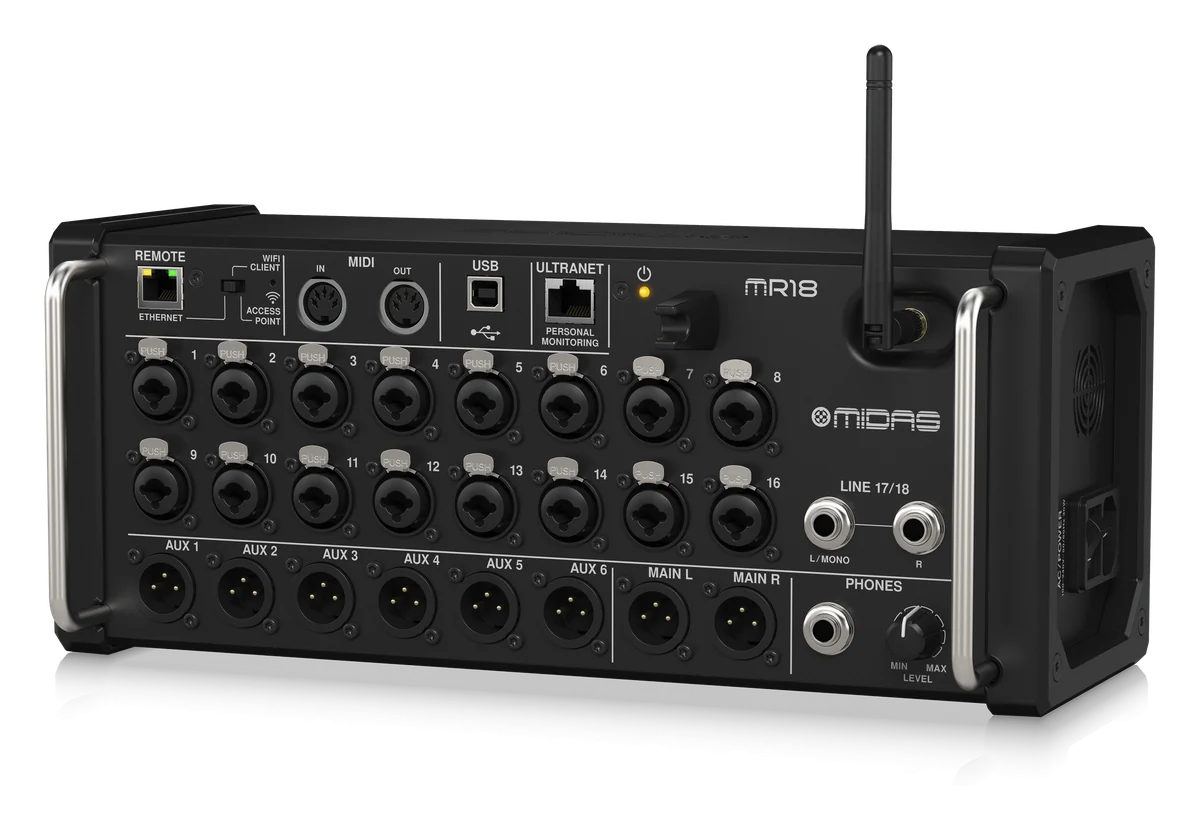
The Midas MR18 is an 18-input digital mixer in a stage box chassis, built for iPad and Android tablets. It has 16 Midas PRO mic preamps, a stereo line input pair and six XLR aux outputs. It also has four stereo effects engines and an 18 x 18 USB audio interface. Since it has no control surface, you mix it from the M AIR apps over Ethernet or Wi-Fi. Showcaller AI adds voice and chat control to the Midas MR18 through the Showcaller Bridge App. The Behringer X AIR and Midas MR integration page lists every function.
How Showcaller works with the Midas MR18
The Bridge App connects to the mixer over the network and sends OSC on port 10024. Then Showcaller turns plain requests into Tool Function calls. For example, you can say mute the audience mic or more presenter in aux 3. You can also say load snapshot 12. When you connect, choose the MR18 model. As a result, Showcaller offers all six mix buses, as on the XR18. The MR12 and XR12 get buses 1 to 4 in Showcaller.
Tool Functions by plan
On Starter, Showcaller sets and reads channel faders and mutes, and renames channels. It rides and mutes the main LR output and buses 1 to 6. It also sets each channel’s send to a bus for wedges or in-ears. Pro adds the four DCA groups, plus preamp gain and 48V phantom power on XLR inputs 1 to 16. It also adds polarity, the high-pass filter and the four-band channel EQ. Gates and compressors are part of Pro too. Then Enterprise adds sends into the four built-in effects, plus FX return and aux return levels. Enterprise also adds channel colors and snapshots 1 to 64.
Midas MR18 and Behringer XR18
The Behringer XR18 shares the MR18 layout. Both are Music Tribe brands. Each mixer has 16 mic preamps, two line inputs and six XLR aux outputs. Each also has ULTRANET, MIDI and an 18 x 18 USB interface. However, the MR18 uses Midas PRO preamps, while the XR18 has preamps designed by Midas. The MR18 also weighs 3.9 kg, against 3.2 kg for the XR18. In Showcaller, both get the same Tool Functions and buses 1 to 6. See the Behringer XR18 page for that model.
Network setup is the one thing to plan. The MR18 REMOTE switch selects Ethernet, Wi-Fi client or access point mode. For Showcaller, a wired Ethernet link to the Bridge App computer works best. That is because each read waits at most 0.3 seconds. Also, Showcaller asks you first before it loads or saves a snapshot, switches phantom power or changes an effects send. For full specs, see Midas’s MR18 product page.
What you can do
Run the Midas MR18 by voice or chat
Six aux buses for monitor mixes
Ride and mute buses 1-6 and set each channel's send to them, for wedges or in-ears (Starter).
Four DCA groups
Assign channels to DCA 1-4 (Pro). Ride, mute and name each DCA, for example Presenters or Music.
16 Midas PRO preamps, set remotely
Read and set gain and 48V phantom power on XLR inputs 1-16, flip polarity and set the high-pass filter (Pro). Phantom changes are confirmed first.
Effects and snapshots
Send channels into the four built-in effects and set FX and aux return levels (Enterprise). Color channels, and load or save snapshots 1-64.
Specifications
Midas MR18 at a glance
Mixing
- Processing channels
- 18 input channels, 4 FX return channels, 6 aux buses, main LR
- Effects engines
- 4 true stereo
- Signal processing
- 40-bit floating point
I/O
- Mic preamps
- 16 XLR/TRS combo jacks, balanced, MIDAS PRO design; 48 V phantom power per input
- Line / aux inputs
- 2 TRS, balanced (stereo)
- Outputs
- 2 XLR main, 6 XLR aux, 1 TRS phones; +21 dBu max.
- USB audio / MIDI interface
- USB 2.0 type B, 18 x 18 audio channels, 16 x 16 MIDI channels
- ULTRANET / MIDI
- 1 RJ45 / 1 in, 1 out (DIN)
Control & network
- Ethernet
- 1 RJ45
- Wi-Fi
- IEEE 802.11 b/g, 2.4 GHz, external SMA antenna; access point up to 4 clients
- Remote modes
- Ethernet LAN, Wi-Fi client or access point, set with the REMOTE switch
- Manufacturer remote apps
- M AIR EDIT (PC, Mac, Linux), M AIR MIX for iPad and Android
Physical
- Dimensions (H x W x D)
- 140 x 333 x 149 mm (5.8 x 13.1 x 5.9")
- Weight / power
- 3.9 kg (8.6 lbs) / 30 W
From Midas
- Product pageOfficial product page and full specificationsmidasconsoles.com (opens Midas’s site in a new tab)
- Support and downloadsFirmware, software and manualsmidasconsoles.com (opens Midas’s site in a new tab)
- DatasheetPDF from the manufacturercdn-media.empowertribe.com (opens Midas’s site in a new tab)
Specifications from the manufacturer. Check the product page for the current details.
Connection
Connecting the Midas MR18
- Control protocol
- OSC over the network, through the Showcaller Bridge App running on a computer on the same network as the mixer
- Port
- 10024 (the default). Only change it if your mixer has been set up to use a different port.
- Recommended link
- Wired Ethernet from the MR18's RJ45 port to the Bridge App's network. Showcaller waits 0.3 s for a read. Over Wi-Fi, replies can take longer than that. That is especially true on the mixer's own access point in a busy 2.4 GHz room.
- What Showcaller asks for
- The mixer's IP address and the model (MR18). The model sets which buses are offered: 1-6 on the MR18.
- Model family in Showcaller
- XAir (shared by Behringer XR12 and XR18, Midas MR12 and MR18)
- Connection check
- The Get mixer info Tool Function sends the mixer an information request and reports whether it answered
Tool Functions
Everything Showcaller can do with Behringer XAir / Midas MR
The Midas MR18 uses the Behringer XAir / Midas MR integration. Each group shows the plan it is included from.
FAQ
Questions about the Midas MR18
What is the difference between the Midas MR18 and the Behringer XR18?
They share one layout: 16 mic preamps, six XLR aux outputs and an 18 x 18 USB interface. The MR18 uses Midas PRO preamps and the M AIR apps. Showcaller gives both the same Tool Functions and buses 1 to 6.
How many monitor mixes can Showcaller control on the MR18?
Six. Showcaller sets bus masters, mutes and each channel's send for aux buses 1 to 6. These are the MR18's six aux outputs.
Can Showcaller load snapshots on the MR18?
Yes, on the Enterprise plan. Showcaller loads a saved snapshot (1-64) or saves the current mix as a named snapshot. It asks you to confirm first.
Can I connect Showcaller to the MR18 over its own Wi-Fi?
It can work, but wired Ethernet is recommended. Showcaller waits at most 0.3 seconds for each read. On a busy 2.4 GHz network, the MR18's reply can arrive later than that.
Which Showcaller plan do I need?
Starter has 14 Tool Functions for diagnostics and channel faders, mutes and names. They also cover the main LR output and the mix buses. Pro adds 17 more Tool Functions for DCA groups, preamps and input, and channel EQ. They also cover gates and compressors. Enterprise adds effects and snapshots (6 more). Each plan includes the Tool Functions of the plans below it.
Same integration
Other Behringer XAir / Midas MR models
 Behringer XR12Model page
 Behringer XR18Model page
 Midas MR12Model page