Blackmagic ATEM Mini Series
Showcaller AI switches your ATEM Mini Pro or Mini Pro ISO by voice or chat. It runs cuts and transitions, keyers, the HDMI aux output and macros. It also controls the built-in stream and recorder.
Overview
The Blackmagic ATEM Mini Series with Showcaller
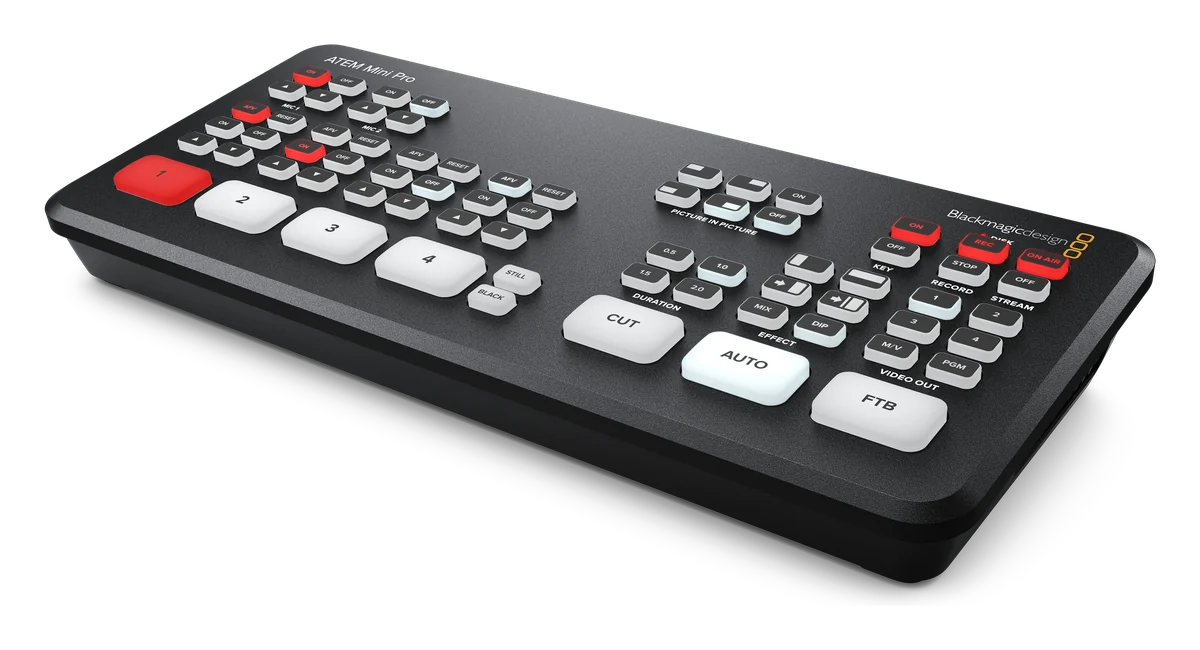
The ATEM Mini Series is Blackmagic Design’s compact HDMI switcher range. Blackmagic currently lists two four-input models in it: the ATEM Mini Pro and the ATEM Mini Pro ISO. Both have four HDMI inputs, each with its own standards converter. Each has one upstream and one downstream keyer, and a DVE for picture in picture. Both also have a built-in streaming engine and USB-C recording. Showcaller AI connects to the switcher’s Ethernet port through the Bridge App. Then it runs the switcher by voice or chat. So the presenter or director can switch without reaching for the buttons. The Blackmagic ATEM integration page lists every function.
Switching an ATEM Mini Pro by voice
On a four-input switcher the requests are short. Put the laptop on Preview, or take camera 2 with a mix. Cut back to the wide, then fade to black at the end. First, Showcaller reads what the switcher has and the input names set in ATEM Software Control. So “Laptop” or “Camera 2” work as well as input numbers. Before the take, it can set the transition style (Mix, Dip, Wipe or DVE) and its duration in frames. These functions are in every plan.
Keyers, streaming and recording
From the Pro plan, Showcaller puts the upstream and downstream keyers on or off air. It also sets their fill and key sources. The upstream keyer can be a chroma key or a picture-in-picture box. Meanwhile, the downstream keyer can carry a lower third from the media pool. Showcaller routes a source to the HDMI output, which Blackmagic counts as the switcher’s one aux output. In addition, it runs or stops macros recorded on the switcher. It starts and stops the stream (RTMP or SRT) and the recorder, too. Then it reports whether recording or streaming is running, and any disk or encoder error. On the ATEM Mini Pro ISO, the same recorder can write each HDMI input as a separate H.264 file. These files sit next to the program recording, with a DaVinci Resolve project file.
Fairlight audio
Audio on these models runs through Blackmagic’s mixer. It has a Fairlight compressor, gate, limiter and 6-band parametric EQ. So Showcaller’s Fairlight Audio functions (Enterprise) apply. They set EQ bands, dynamics and makeup gain per input. They also set the master EQ and compressor. However, the classic Audio Mixer and Super Source functions are not available on ATEM Mini Series. For eight HDMI inputs, Super Source and more aux outputs, see the ATEM Mini Extreme Series page. For full specs, see Blackmagic’s ATEM Mini page.
What you can do
Run the Blackmagic ATEM Mini Series by voice or chat
Switch by input name
Cut, run an Auto transition or fade to black. Put a source on Preview and take it in one step. Use the input names set on the switcher. Starter.
Keyers and the HDMI aux
Put the upstream or downstream keyer on or off air and set its fill and key sources. Choose what the HDMI aux output shows. Pro.
Stream and record on cue
Start and stop the built-in RTMP/SRT stream and the USB-C recorder. Get a report of whether each is running, and of any disk or encoder error. Pro.
Macros from the switcher
List the macros recorded on the Mini, run one by slot number, or stop the one that is running. Pro.
Fairlight EQ and dynamics
Set an EQ band, compressor, gate, limiter or makeup gain on an audio input. Or set the master EQ and compressor. Enterprise.
Specifications
Blackmagic ATEM Mini Series at a glance
Video
- Models covered
- ATEM Mini Pro, ATEM Mini Pro ISO
- Video inputs
- 4 x HDMI type A, 10-bit HD switchable, each with a frame rate and format converter
- Video standards
- Up to 1080p60 (720p, 1080i and 1080p); no Ultra HD
- Outputs
- 1 x HDMI program output; 1 aux output
- Keyers and DVE
- 1 upstream keyer (advanced chroma key), 1 downstream keyer, 1 DVE with borders and drop shadow; DVE transitions only
- Media
- 20 stills with fill and key; 1 media player
- Multiview
- 1 x 10 views: program, preview, 4 inputs, media player, streaming and recording status, audio meters
Audio
- Audio mixer
- 6 input x 2 channel mixer with On/Off/Audio-Follow-Video, compressor, gate, limiter and 6-band parametric EQ
- Analog audio inputs
- 2 x 3.5mm stereo mini jack with mic plug-in power
Streaming & recording
- Streaming
- RTMP and SRT over Ethernet or a shared internet connection over USB-C
- Recording
- Mini Pro: program as H.264 .mp4 to USB-C media. Mini Pro ISO: 4 HDMI inputs plus program as H.264 .mp4, plus a DaVinci Resolve project file
Control & network
- Ethernet
- 10/100/1000 BaseT for streaming, software control, updates and panel connection
- Computer interface
- 1 x USB Type-C 3.1 Gen 1 for recording, webcam out, software control and updates
Physical
- Power
- External 12V supply; 30 W (Mini Pro), 36 W (Mini Pro ISO)
Specifications from the manufacturer. Check the product page for the current details.
Connection
Connecting the Blackmagic ATEM Mini Series
- Control protocol
- Blackmagic ATEM network protocol over UDP on your local network, through the Showcaller Bridge App
- What Showcaller needs
- The switcher's IP address. No username or password is needed on the ATEM.
- Network
- Connect the switcher's Ethernet port to the same network as the computer running the Bridge App. Blackmagic sets the switcher's IP address with ATEM Setup Utility over a direct USB connection.
- Switcher software
- ATEM software 9.x
- First check
- After connecting, Showcaller runs Get status. It checks that it can reach the switcher and read which inputs are on Program and Preview.
Tool Functions
Everything Showcaller can do with Blackmagic ATEM
The Blackmagic ATEM Mini Series uses the Blackmagic ATEM integration. Each group shows the plan it is included from.
FAQ
Questions about the Blackmagic ATEM Mini Series
Can Showcaller start the live stream on an ATEM Mini Pro?
Yes, from the Pro plan. Showcaller starts and stops the switcher's built-in stream and recorder. It reports whether each is running, and any disk or encoder error. The stream goes to the destination already set up on the switcher.
Can I adjust audio levels on an ATEM Mini with Showcaller?
The ATEM Mini Series uses the mixer with Fairlight processing. So Showcaller's Fairlight Audio functions apply (Enterprise). They cover EQ bands and makeup gain on each input, plus its compressor, gate and limiter. They also cover master EQ and compressor. The classic Audio Mixer functions set input level and Audio-Follow-Video. They are for switchers like Television Studio HD and do not work on the ATEM Mini Series.
Does picture in picture work on an ATEM Mini?
The Mini Pro and Mini Pro ISO make picture in picture with the DVE on the upstream keyer. Showcaller can put that keyer on or off air and set its fill and key sources (Pro). Super Source layouts are not available on ATEM Mini Series.
Is the ATEM Mini Extreme covered on this page?
No. The ATEM Mini Extreme models have eight HDMI inputs, more keyers and aux outputs, and Super Source. They are a separate model in Showcaller: ATEM Mini Extreme Series.
Do I need to type input numbers?
No. Showcaller lists the inputs with the names set on the switcher, so you can ask for "Camera 2" or "Laptop".
Same integration
Other Blackmagic ATEM models
 ATEM Constellation / TV StudioModel page
 ATEM Mini Extreme SeriesModel page
 ATEM SDI SeriesModel page