Yamaha DM3 Series
Showcaller AI runs the Yamaha DM3 and DM3 Standard by voice or chat, over Yamaha's own remote control protocol. It covers input faders and mutes, Mix sends and the Main, Mix and Matrix masters.
Overview
The Yamaha DM3 Series with Showcaller
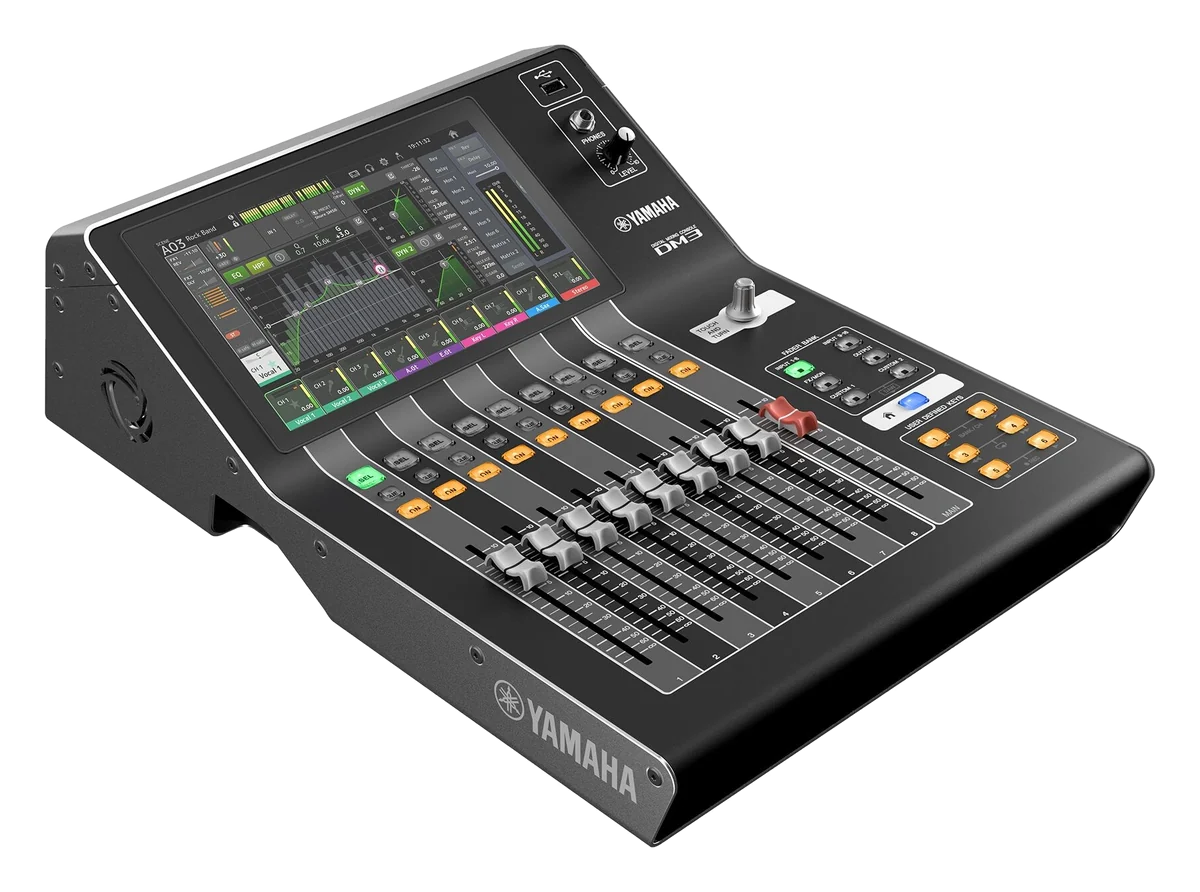
The Yamaha DM3 series is a compact 96kHz digital console in two models. The DM3 has Dante built in, while the DM3 Standard does not. Both mix 16 mono inputs, 1 stereo input and 2 FX returns. They have 6 Mix buses, 2 Matrices and a Stereo bus. They also have 16 analog inputs, 8 analog outputs and a 9-inch multi-touch screen with 9 faders. An RJ-45 Network port serves DM3 Editor and DM3 StageMix. Showcaller AI uses that port to control the Yamaha DM3 by voice or chat.
How Showcaller connects to the Yamaha DM3
Showcaller connects through the Showcaller Bridge App on the show network. It uses Yamaha’s native remote control protocol on TCP port 49280, with no login. Then the operator asks in plain words. For example, mute input 5 or Mix 2 down 3 dB. They can also ask more vocal in Mix 4 or is Matrix 1 muted. Showcaller reads every change back from the console before it reports it done. If the console disagrees, it reports the mismatch. The Yamaha mixer integration page lists every function.
What applies on the Yamaha DM3
The DM3 has no DCA groups. So the DCA Tool Functions are not available on this console. Scene recall is also not available on the DM3 in Showcaller. It works on Yamaha CL and QL consoles only. Recall DM3 scenes from the console, DM3 Editor or DM3 StageMix instead. On the other hand, the DM3’s 2 Matrices are covered. Showcaller rides and mutes both Matrix masters on the Pro plan.
Tool Functions by plan
Starter covers input faders and mutes, the Main Stereo master and the Mix bus masters, with reads for each. Pro adds the Matrix masters. It also adds each input’s send level and on/off state to a Mix bus. As a result, the Pro plan already includes every Tool Function Showcaller offers for the DM3. Both models use the same Tool Functions. For full specs, see Yamaha’s DM3 series page.
What you can do
Run the Yamaha DM3 Series by voice or chat
6 Mix buses, read and set
Ride and mute the Main Stereo master and the Mix bus masters, and read their levels and mute state (Starter).
Mix sends, level and on/off
Set how much of an input goes to a Mix bus and switch individual sends on or off (Pro).
2 Matrix outputs
Ride and mute both Matrix masters, with read-back (Pro).
Pro covers it all
The DM3 has no DCA groups, and scene recall is CL and QL only. So Pro includes every Tool Function available on the DM3.
Read back on every change
Each change Showcaller makes on a Yamaha console is read back from the console, and a mismatch is reported.
Specifications
Yamaha DM3 Series at a glance
Mixing
- Input channels
- 16 mono + 1 stereo + 2 FX return
- Buses
- 6 Mix, 2 Matrix (input to Matrix supported), 1 Stereo, 2 FX, 1 Cue
- Sampling rate
- 96 kHz / 48 kHz
I/O
- Analog inputs / outputs
- 16 mic/line (12 XLR + 4 XLR/TRS combo) / 8 XLR
- Dante
- DM3: 2 etherCON (Primary / Secondary); DM3 Standard: none
- USB
- USB to Host (18-track recording and playback); USB to Device (2-track)
Control & network
- User interface
- 9-inch multi-touch screen, 9 faders (8 channels + 1 main), Touch and Turn encoder
- Network
- 1 RJ-45
- Manufacturer software
- DM3 Editor, DM3 StageMix, MonitorMix
Physical
- Dimensions (W x H x D)
- 320 x 140 x 455 mm (12.6 x 5.6 x 18.0")
- Net weight
- 6.5 kg (14.3 lb)
- Power
- 43 W; DC 24 V via PA-L500 adapter; rack mount kit RK-DM3
From Yamaha
Specifications from the manufacturer. Check the product page for the current details.
Connection
Connecting the Yamaha DM3 Series
- Control protocol
- Yamaha's native remote control protocol (RCP) over TCP/IP, through the Showcaller Bridge App. The Bridge App runs on a computer on the same network as the console.
- Port
- TCP 49280, the same on every supported Yamaha console. No login is needed.
- Console connection
- Connect the DM3's RJ-45 Network port to the same network as the Bridge App computer. On the DM3, the Dante Primary and Secondary ports are for audio.
- What Showcaller asks for
- The console's IP address and the console series (DM3), so the right Tool Functions are offered
- Model family in Showcaller
- DM3
- Connection check
- The Get status Tool Function reads back whether the console's main stereo output is on. That confirms the console is answering.
Tool Functions
Everything Showcaller can do with Yamaha Mixer
The Yamaha DM3 Series uses the Yamaha Mixer integration. Each group shows the plan it is included from.
FAQ
Questions about the Yamaha DM3 Series
Can Showcaller control DCA groups on a Yamaha DM3?
No. The DM3 has no DCA groups, so the DCA Tool Functions are not available on it. Use Mix and Matrix masters and input mutes instead.
Can Showcaller recall scenes on a Yamaha DM3?
Not at the moment. Showcaller's Scene Recall Tool Functions work on CL and QL consoles only. Recall DM3 scenes from the console, DM3 Editor or DM3 StageMix.
Does Showcaller work with the DM3 Standard?
Yes. Showcaller's model is 'Yamaha DM3 Series', which covers the DM3 and the DM3 Standard. They share the same mixing capacity; only the DM3 has Dante.
Does Showcaller confirm changes on the DM3?
Yes. Every change it makes is read back from the console before it reports it done, and a mismatch is reported.
Which Showcaller plan do I need for a DM3?
Starter covers diagnostics, input faders and mutes, and the Main and Mix masters. Pro adds Matrix masters and Mix sends. DCA groups and Scene Recall do not apply to the DM3. So Pro covers everything Showcaller offers for this console.
Same integration
Other Yamaha Mixer models
 Yamaha CL SeriesModel page
 Yamaha DM7 SeriesModel page
 Yamaha QL SeriesModel page
 Yamaha Rivage PM SeriesModel page