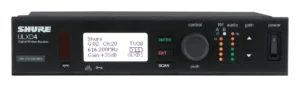
Shure ULXD4D dual-channel receiver
Showcaller AI reads and sets both channels of a Shure ULXD4D by voice or chat. It covers transmitter battery, output mute and gain, plus channel names and frequency.

Overview
The Shure ULXD4D dual-channel receiver with Showcaller
The Shure ULXD4D puts two ULX-D digital receivers in one rack unit. Each has its own gain control, meters and XLR output, and the unit has Dante on two Ethernet ports. Showcaller AI connects to the receiver over your show network through the Bridge App. Then it answers the questions an A2 asks all show long, for channel 1 or channel 2. For example: How long is left on the lectern pack? What gain is channel 2 at? Is the panel mic muted? The Shure wireless integration page lists every function.
Battery and status on the Shure ULXD4D
Showcaller reads the status of both channels in one request. For each channel, it reads the transmitter battery as bars (0 to 5) and the estimated runtime in minutes. For Shure rechargeable batteries, it also reads the charge and health percentages. By comparison, Shure’s receiver shows runtime in minutes for Shure rechargeables on its own display, and a 5-bar indicator for AA batteries. Battery and mute functions are in every plan.
Remote mute and gain
Remote mute is the main difference between ULX-D and the QLX-D and SLX-D receivers. On the ULXD4D, Showcaller mutes and unmutes each channel’s audio output. It does this without dropping the RF link to the transmitter. However, Shure notes that a power cycle unmutes the outputs. So ask Showcaller for the mute state after a restart. From the Pro plan, Showcaller reads and sets each channel’s output gain in 1 dB steps. The range is -18 to +42 dB, the receiver’s own range. It also names the channels, so “Lectern” and “Panel 1” appear on the front panel.
Frequencies on Enterprise
With Enterprise, Showcaller reads each channel’s frequency in kHz and its Group and Channel. It can move a channel to a new frequency or Group/Channel from Shure’s coordinated sets. First, though, it asks you before it retunes. Then re-sync the transmitter to the new frequency as you normally would. Showcaller can also flash the front-panel LEDs to find the unit in a rack of identical receivers. Showcaller does not scan the spectrum or lock transmitters. Also, you set up frequency diversity and audio summing on the receiver or in Wireless Workbench. Meanwhile, Showcaller reads and sets each channel on its own. For full specs, see Shure’s ULXD4D product page.
What you can do
Run the Shure ULXD4D dual-channel receiver by voice or chat
Battery on both channels
Battery bars and runtime in minutes for each channel, plus charge and health percentage for Shure rechargeables. Starter.
Remote output mute
Mute or unmute channel 1 or 2 without dropping the RF link, and read the mute state. ULX-D only. Starter.
Gain in 1 dB steps
Read or set each channel's output gain from -18 to +42 dB. Pro.
Frequency and Group/Channel
Read or change a channel's frequency or Group/Channel. Showcaller asks before it retunes. Enterprise.
Find it in the rack
Flash the ULXD4D's front-panel LEDs, then stop the flash once it is found. Enterprise.
Specifications
Shure ULXD4D dual-channel receiver at a glance
RF
- Channels
- 2 independent receivers in one 1RU metal chassis
- Tuning range
- Up to 166 MHz per band, region dependent; bands listed on shure.com (US): G57, V50, X52
- RF tuning step
- 25 kHz, varies by region
- Working range
- 100 m (330 ft); depends on RF conditions
- Diversity
- Digital predictive switching diversity; bodypack frequency diversity across two channels
- RF cascade
- BNC cascade output for one additional receiver in the same band
Audio
- Gain adjustment range
- -18 to +42 dB in 1 dB steps, plus Mute
- Audio outputs
- 1 XLR per channel, balanced, mic/line switchable (30 dB pad); audio summing can route both channels to each output
- Latency
- < 2.9 ms
- Dynamic range
- > 120 dB XLR analog, 130 dB Dante (A-weighted, system gain +10)
Control & network
- Network interface
- Dual-port Ethernet 10/100 Mbps, 1 Gbps, with Dante digital audio; DHCP or manual IP
- Third-party control
- Ethernet TCP/IP, port 2202
- Encryption
- AES-256
Physical
- Dimensions and weight
- 44 x 482 x 274 mm (H x W x D); 3.36 kg without antennas
- Power
- Internal supply, 100 to 240 V AC, 50-60 Hz
Specifications from the manufacturer. Check the product page for the current details.
Connection
Connecting the Shure ULXD4D dual-channel receiver
- Control protocol
- Shure network control over TCP/IP on port 2202, through the Showcaller Bridge App. No username or password.
- What Showcaller needs
- The receiver's IP address, shown on the front panel in the Network menu, and the model ULXD4D (Dual Channel).
- Network
- Connect the receiver to the same network as the Bridge App. In Dante Redundant or Split mode, use the port that carries Shure Control, not the Dante-only port.
- Firmware
- Showcaller reads the receiver's firmware version when it connects. On newer firmware, third-party network control may need to be switched on in Wireless Workbench or the receiver's web interface.
- First check
- Showcaller reads the firmware version to check it can reach the receiver, then reads the status of both channels.
Tool Functions
Everything Showcaller can do with Shure Wireless
The Shure ULXD4D dual-channel receiver uses the Shure Wireless integration. Each group shows the plan it is included from.
FAQ
Questions about the Shure ULXD4D dual-channel receiver
Can Showcaller mute a channel on a Shure ULXD4D?
Yes, in every plan. Showcaller mutes and unmutes each channel's audio output without dropping the RF link, and reads the mute state. Shure notes that a power cycle unmutes the receiver outputs. Remote mute works on ULX-D receivers only, not on QLX-D or SLX-D.
How much battery is left on a ULX-D transmitter?
Ask Showcaller for the channel's battery runtime in minutes or battery bars. With Shure rechargeable batteries it can also report charge and battery health as a percentage.
Can Showcaller change the frequency of a ULXD4D channel?
Yes, with the Enterprise plan. It sets a new frequency or Group/Channel from Shure's coordinated sets and asks you before it retunes. It does not run an RF scan.
What is the difference between the ULXD4D, ULXD4 and ULXD4Q in Showcaller?
The Tool Functions are the same on all ULX-D receivers. The ULXD4D has two channels, the ULXD4 one and the ULXD4Q four. Pick the matching model when you connect so Showcaller addresses the right channels.
Can Showcaller lock a ULX-D transmitter?
No. Showcaller does not lock or unlock bodypacks or handhelds. Lock the transmitter on the transmitter itself, as described in Shure's ULX-D guide.
Same integration
Other Shure Wireless models
 QLXD4 (Single Channel)Integration page
 SLXD4 (Single Channel)Integration page
 SLXD4D (Dual Channel)Integration page
 ULXD4 (Single Channel)Integration page
 ULXD4Q (Quad Channel)Integration page